11/19/2026
From 91 Clips to a 2:26 Premiere: Editing Coach Grinkler
Short answer: AI made the shots, and the edit made the video. Aaron wrote, produced and edited this one: ninety-one AI-generated clips became a 2:26 premiere of Coach Grinkler through nine test cuts and a handful of fixes. The fixes are the part you can copy, so they come first.
Where we left Coach Grinkler
In the first post, "Meet Coach Grinkler: Building an AI Spokesman, 91 Clips In", we introduced our first AI spokesperson, a coach at fictional Port Rockaboo with a lot of stories about 1986. He is not real, and neither is anyone else in the video: everyone on screen is AI-generated, and Port Rockaboo, its school and its people are fictional.
What we had was a folder. Google Flow and Gemini generated the clips. Some were keepers and some were bloopers, and a folder of clips is not a video. The result is Coach Grinkler's Big Premiere | Next Day Videos on YouTube.
One story from 91 separate clips
Ninety-one separate clips do not arrive with continuity built in. The first post showed the fictional town's name spelled several different ways on different banners, and in this video a commentator turned up twice. A 2:26 film needs one coach, one crowd and one school that stays the same school from the first shot to the last, so the story had to be built in the edit. The finished film uses 29 different clips.
The cut follows the music:
- The music enters on a downbeat, right after the school band's trumpet stops.
- The student-media burst is five shots on five bars of the chorus riff, each shot held to the length of its bar.
- The music's level changes are timed to bars too, for example gliding down over a few seconds into the next line.
- The song stops dead, with a needle-scratch, as the film goes quiet for Brian's song.
What the AI got wrong that the edit had to fix
Each of these is a repair, and each comes down to the same question: what are the people in this shot doing, and why?
| Shot | What was wrong | The fix |
|---|---|---|
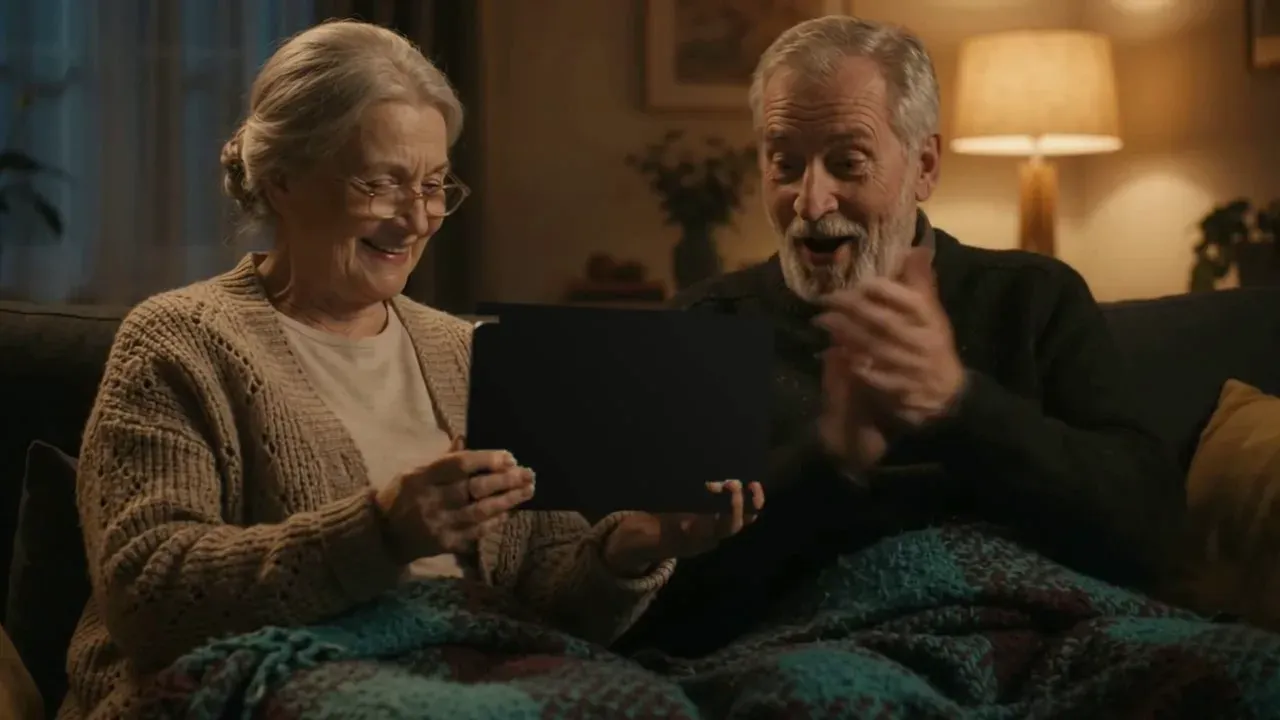
| Grandparents cheering | They were cheering at the back of a tablet whose screen faced the camera | Tracked the tablet's rim and her fingers frame by frame, painted the screen as the dark back of a case, then restored her fingers over the paint |
| A parent in the stands | She was filming on a phone instead of watching | Cropped the shot to the dad cheering beside her |
| A wrestling commentator | The commentator appeared twice | Replaced the repeat in one cutaway with a student control room: three students at the switchers. The burst still holds two wrestling shots |
The tablet that faced the wrong way
Grandparents cheering at a tablet is a lovely moment, until you notice the tablet's screen faces the camera, so they are cheering at the back of it. Painting the screen over as the back of the case, frame by frame, shows the viewer the back of the tablet, so its screen reads as facing the grandparents, where it belongs.
The fix was a short Python script using the OpenCV computer vision library. It follows the tablet's rim and her fingers from frame to frame with optical flow, paints the screen area as the dark back of a case, and puts her skin-toned fingers back over the paint. It tracks the rim and the fingers, not the screen, because the screen's generated picture slides around. The settings that mattered: the tablet's four corners set by eye on the first frame, a forward-backward check on the tracked points, a RANSAC affine fit, a paint grown 4 pixels past the rim, and skin blobs under 250 pixels ignored. If you ever have to patch an AI clip, track the thing that is physically attached to the object, not the picture drawn on it.
The parent who filmed instead of watching
A parent in the stands was filming on a phone instead of watching. We cropped to the dad cheering beside her. The crop is a setting in the cut list, applied by the render script, not a separate tool. That is also the point of a student livestream: when the broadcast is the one filming, the family gets to watch.
The commentator who showed up twice
A commentator who appears twice reads as a mistake. The second appearance became a student control room, with three students at the switchers. Trial 9 existed only to make that swap.
A checklist can tell you to watch past the first second. It cannot tell you the grandparents are looking at the wrong side of the tablet. Our AI Video Checklist covers text, sound, frozen frames and disclosure, and then you still have to ask, of every shot, who is doing what and why.
Nine test cuts: Claude proposes, Aaron steers
The edit was done as cut lists. Claude, running the Opus model, wrote the cut lists for these nine trials, and a script rendered each one into a video. Each trial was saved as a new revision of one cut in Aaron's Media Hub, so the first version still sits beside the ninth. The three biggest rounds of changes, trials 2, 5 and 6, answer Aaron's notes.
An earlier cut of the same story is kept in Media Hub as a cut of its own. A Site Studio agent and Claude's Sonnet model edited that one, so the nine trials are not the whole editing history.
Because the cut is a list, a change is a line in the list and a new render.
The credit for the work is not one line long:
| Job | Who or what |
|---|---|
| Wrote, produced and edited | Aaron |
| Clips | Google Flow and Gemini (the YouTube description credits Google Flow; Media Hub records some clips as Gemini, so we name both) |
| Voices | Google Flow, as the YouTube description credits them |
| Cut lists for the nine trials | Claude (Opus) |
| The earlier cut kept beside them | A Site Studio agent and Claude (Sonnet) |
| Rendering each trial | A script, from the cut list |
| Tracking and painting the tablet screen | A short Python script using OpenCV |
| The crop of the parent in the stands | A crop setting in the cut list, applied by the render script |
| Keeping every revision | Media Hub, Aaron's media library |
| Music | Original melody by Aaron, produced with help from AI (Google Flow Music) |
| Notes behind the three biggest rounds of changes | Aaron |
One video, three shapes, and captions
The premiere came out in these forms:
| Piece | What it is |
|---|---|
| YouTube master | 2:26, 1440p |
| Vertical teaser | 51 seconds, captions burned in, for Reels, Shorts and X |
| Behind-the-scenes short | About 33 seconds |
| YouTube captions | A captions file for the master |
Captions are burned into the vertical teaser so they travel with it to every platform. If you are wondering what the standards ask for, we wrote about what WCAG asks of captions on business videos.
Labeling it as AI, on every platform, on purpose
YouTube's help page on disclosing generative AI content asks creators to disclose realistic AI-generated content. Our upload kit sets that disclosure to Yes, and the video's description says it in plain words: "Video and voices generated with AI (Google Flow). Port Rockaboo and its people are fictional." We wrote about why in "Let the Star Show: Why We Label Our AI Video on Purpose."
The point for schools: students can run this
The three students at the switchers are the part of this video a school can actually do for itself. Students can run the cameras, the switcher and the show for their own school's games, which is what a student-run broadcast program is.
If you are an athletic director, a principal or a booster weighing a student livestream, the free plan preview takes about twelve minutes. For the other question, what a student broadcast program really costs is its own post.
And if you are a business owner who wants to know what AI video takes to finish, plan for the edit, not just the clips. The clips are the raw material. What you ship is decided in the cut.
Researched and drafted with AI, then reviewed and edited by the site's editors.